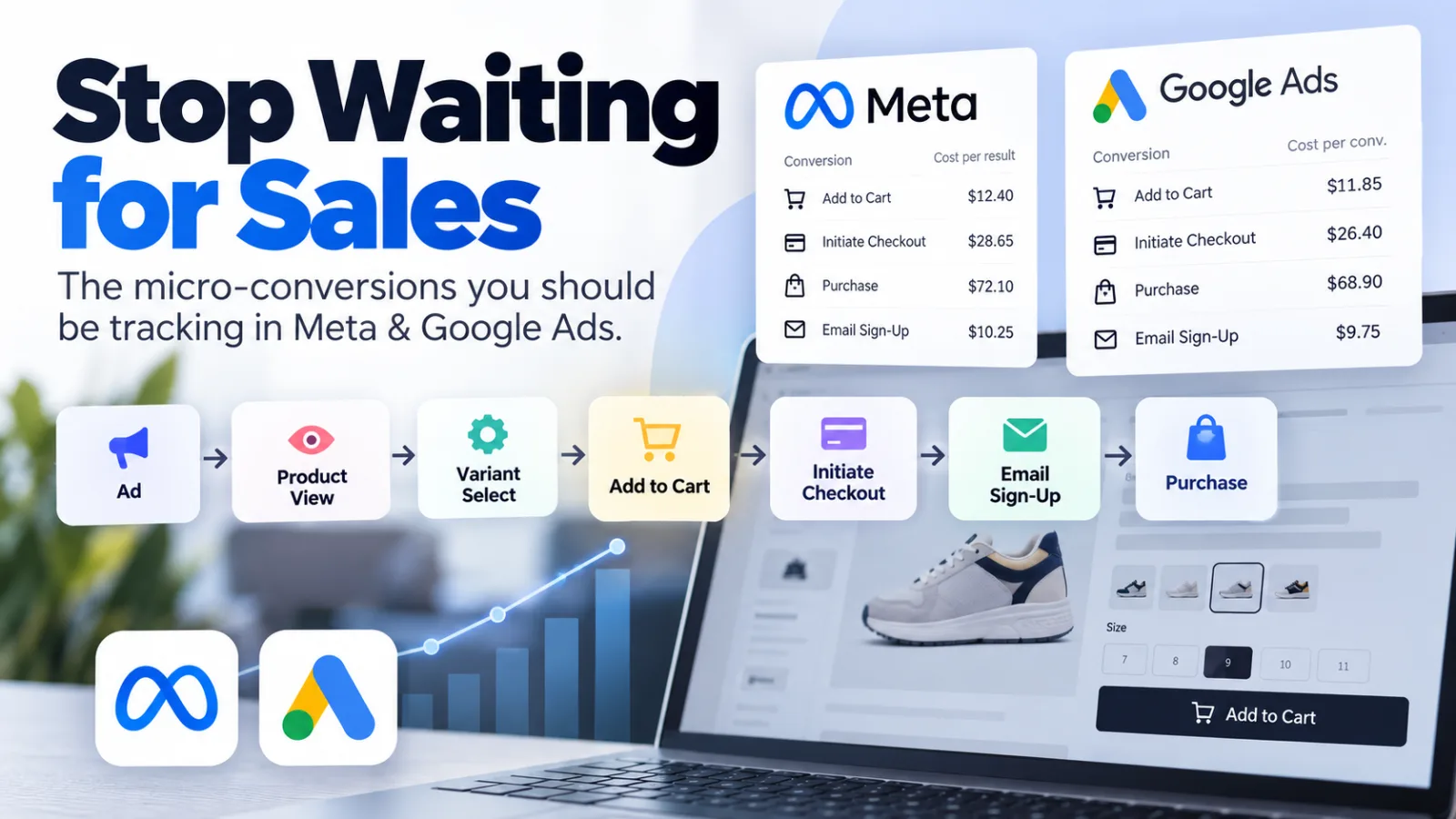
One of the quickest ways to understand whether your ad campaigns are working is to stop looking at sales alone.
When we launch a new ad campaign, it's easy to wait a few days—or even a week—and hope the sales start coming in. Sometimes we'll wait even longer because we know platforms like Meta and Google can take time to learn which audiences are most likely to convert.
But there's a problem with this approach.
If there are no sales, you've potentially wasted a significant amount of your advertising budget before you know something is wrong.
Instead of only tracking purchases, you should also be tracking what happens before the purchase.
These smaller actions are often called micro-conversions, and they can give you an early indication of whether your campaigns are sending the right traffic.
For ecommerce campaigns, two of the most useful ones to start with are:
Add to Cart
Email Sign-Up
And depending on your website, there are other useful signals you can track too, such as product variant selections and initiated checkouts.
Don't wait for a purchase to tell you something is wrong
Think about your ecommerce funnel:
Ad → Product View → Add to Cart → Checkout → Purchase
A purchase is obviously the conversion you ultimately care about.
But if you're spending money to generate traffic, there are several things you can learn before somebody buys.
For example, imagine you've spent $500 on a new Meta campaign.
You have no sales.
That's not necessarily a problem. Maybe the campaign simply hasn't had enough time or traffic yet.
But now imagine you also discover that you've generated:
1,500 ad clicks
1,200 website visitors
8 Add to Carts
2 email sign-ups
0 purchases
That's a very different situation.
You now have evidence that people are arriving on your website, but very few are taking meaningful actions.
You can start investigating the problem before continuing to spend money and hoping things improve.
That's the real value of micro-conversion tracking.
Track Add to Cart as an early warning signal
Add to Cart (ATC) is one of the most useful micro-conversions for ecommerce advertising.
A click tells you that someone was interested enough in your ad to visit your website.
An Add to Cart tells you something more.
The visitor has looked at the product and taken a meaningful action that indicates purchase intent.
That makes Add to Cart particularly useful when you're evaluating a new campaign that hasn't generated enough purchases to make a decision.
One metric I like to look at is Cost per Add to Cart.
How to calculate Cost per Add to Cart
Cost per ATC = Total advertising spend ÷ Number of Add to Carts
For example:
You spend $500 on advertising and generate 25 Add to Carts.
$500 ÷ 25 = $20 per Add to Cart
The important thing to remember is that there isn't a universal "good" cost per Add to Cart.
What's acceptable depends on things such as:
Average order value
Gross margin
Purchase conversion rate
Customer lifetime value
Product category
Historical campaign performance
That's why your own historical data is so valuable.
If your previous campaigns typically generate Add to Carts at $15–$20 and a new campaign is suddenly costing $60 per ATC, that's a useful signal that something has changed.
It doesn't automatically mean you should turn the campaign off, but it does mean you should investigate.
[INSERT YOUR REAL EXAMPLE OF A CAMPAIGN WHERE COST PER ATC HELPED YOU MAKE A DECISION]
Email sign-ups are another valuable micro-conversion
Email sign-ups are another useful signal, particularly if you have a strong email marketing program behind your advertising.
Someone might not be ready to purchase on their first visit.
But if they give you their email address, you've acquired a potential customer that you can continue marketing to.
Instead of:
Ad → Website → No Purchase → End
you now have:
Ad → Website → Email Sign-Up → Email Marketing → Future Purchase
If you're using a platform such as Klaviyo, that email address can become part of your ongoing customer journey.
You can potentially use welcome sequences, browse abandonment, abandoned cart and other campaigns to bring customers back.
How to calculate Cost per Email Sign-Up
Cost per Email Sign-Up = Total advertising spend ÷ Number of email sign-ups
For example:
You spend $500 and acquire 50 email subscribers.
$500 ÷ 50 = $10 per email sign-up
It's also useful to look at the actual email sign-up rate.
Email Sign-Up Rate
Email sign-up rate = Number of email sign-ups ÷ Number of website visitors × 100
So if 1,000 people visit your website and 50 sign up:
50 ÷ 1,000 × 100 = 5%
The cost tells you how efficiently your advertising is acquiring subscribers, while the conversion rate tells you how effectively your website is turning visitors into subscribers.
Don't forget the actions between Product View and Add to Cart
Add to Cart isn't necessarily the only useful action you should track.
Depending on what you're selling, there may be another important step in your product journey.
For example, a customer might need to select:
Size
Colour
Product variant
Subscription option
Quantity
Configuration
Other product attributes
Tracking these selections can give you another layer of information about what visitors are actually doing on your website.
For example, you might see:
1,000 Product Views → 600 Variant Selections → 100 Add to Carts → 20 Purchases
That tells you considerably more than simply knowing that you had 20 purchases.
It allows you to start identifying where customers are dropping out of the funnel.
If you're running paid campaigns, these additional events can also help you understand whether people arriving from your ads are genuinely engaging with your products.
Initiate Checkout can help identify another problem
I'd also recommend tracking Initiate Checkout.
This gives you another useful step in the funnel:
Ad → Product View → Add to Cart → Initiate Checkout → Purchase
Now you can start asking much more useful questions.
For example:
Lots of clicks but very few Add to Carts
You may want to investigate:
Traffic quality
Audience targeting
Product page
Pricing
Offer
Landing page
Ad-to-landing-page message match
Lots of Add to Carts but very few checkouts
You may want to investigate:
Cart experience
Shipping costs
Unexpected fees
Product options
Checkout friction
Lots of checkouts but few purchases
You may want to investigate:
Payment problems
Checkout usability
Payment methods
Shipping
Trust
Technical issues
This is where micro-conversions become particularly useful.
They're not just additional numbers in your advertising dashboard.
They help you work out where the funnel is breaking.
Use Cost per ATC to compare campaigns
Once you're tracking these events consistently, you can start comparing campaigns using more than just purchases and ROAS.
For example:
| Campaign | Spend | Purchases | ATCs | Cost / ATC | Email Sign-Ups | Cost / Email |
|---|---|---|---|---|---|---|
| Campaign A | $1,000 | 3 | 80 | $12.50 | 45 | $22.22 |
| Campaign B | $1,000 | 0 | 15 | $66.67 | 8 | $125 |
| Campaign C | $1,000 | 1 | 65 | $15.38 | 41 | $24.39 |
Campaign B hasn't necessarily been given enough time to generate a purchase.
But compared with the other campaigns, it's already producing significantly fewer meaningful actions for the same amount of advertising spend.
That's useful information.
Rather than simply saying:
"There are no sales. Let's wait another week."
you can ask:
"Why is this campaign costing us so much more to generate an Add to Cart?"
That's a much better question.
Micro-conversions can help you decide when to investigate a campaign
This is particularly useful with Meta campaigns.
Sometimes a campaign simply needs more time and data.
Other times, the early signals are telling you that something isn't working.
For example, if your campaign is generating lots of clicks but very few Add to Carts, you might investigate the quality of the traffic, your audience, your creative or your landing page.
If you're generating Add to Carts at a significantly higher cost than your historical campaigns and you're also seeing no purchases, that may be a reason to reconsider the campaign rather than continuing to spend indefinitely.
The important point is:
Don't make the decision based on one metric alone.
Look at the entire funnel.
You might have:
Low CTR → problem may be the ad or audience.
Good CTR + poor ATC rate → investigate the website, product, offer or traffic quality.
Good ATC rate + poor purchase rate → investigate checkout, shipping, pricing or purchase friction.
Good ATCs + good email acquisition + no purchases yet → you may simply need more data.
Your historical performance is particularly important here.
If you know what a normal campaign looks like for your business, you can identify unusual performance much faster.
Give Meta and Google more conversion signals
Micro-conversions aren't only useful for you.
They can also provide additional signals to your advertising platforms.
Meta and Google use conversion data as part of their optimisation systems. Sending meaningful events back to the platforms can help them understand the actions people are taking on your website.
That doesn't mean you should simply send every possible event and treat them all as equal.
A Purchase is fundamentally different from an Email Sign-Up.
And an Email Sign-Up is different from a Product View.
Your conversion strategy should reflect the value of each action.
For example, if your ultimate goal is ecommerce purchases, you don't necessarily want to tell the platform that an email signup is equivalent to a purchase.
Instead, think about micro-conversions as additional signals that help you understand what's happening throughout the funnel.
Set up Add to Cart and Email Sign-Up tracking in Meta and Google
Both Meta and Google Ads allow you to work with conversion events and use them in your reporting and campaign optimisation.
The exact setup will depend on how your website is built and how you're implementing tracking.
At a minimum, make sure your website is correctly sending events for actions such as:
View Content
Add to Cart
Initiate Checkout
Purchase
Lead / Email Sign-Up
Then make sure those events are appearing correctly in your advertising platforms.
Meta
Use your Meta reporting to compare campaign performance and look beyond purchases.
For example, you might compare:
Spend
Purchases
Cost per Purchase
Add to Carts
Cost per Add to Cart
Leads/Email Sign-Ups
Cost per Lead
Google Ads
Google Ads provides similar conversion reporting.
The important thing isn't simply creating more columns in your dashboard.
It's using the information to answer a question:
Is the traffic I'm buying actually behaving like potential customers?
Use Klaviyo to continue the customer journey
If you're using Klaviyo, your advertising doesn't have to end when someone leaves your website without purchasing.
For example:
Meta Ad → Website → Email Sign-Up → Klaviyo → Welcome Flow → Purchase
Or:
Meta Ad → Product View → No Purchase → Browse Abandonment → Return Visit → Purchase
This is why I like looking at advertising as part of the entire customer acquisition funnel rather than judging a campaign entirely on whether somebody purchased immediately.
The advertising platform might generate the initial visit.
Your website might generate the email signup.
Klaviyo might generate the eventual purchase.
Looking at only the first or last step can hide what's actually happening.
Build your own benchmarks
One of the biggest benefits of tracking micro-conversions is that, over time, you can build your own benchmarks.
Instead of asking:
"What's a good cost per Add to Cart?"
you can ask:
"What's a normal cost per Add to Cart for our business?"
That's much more useful.
You can start building benchmarks for:
CTR
CPC
Product View Rate
Add to Cart Rate
Cost per Add to Cart
Checkout Rate
Purchase Conversion Rate
Cost per Email Sign-Up
Cost per Purchase
ROAS
Then when you launch a new campaign, you have something to compare against.
For example, if your normal Cost per ATC is $20 and a new campaign is sitting at $65, that's immediately worth investigating.
Likewise, if a campaign has no purchases yet but is generating Add to Carts at a rate similar to your successful campaigns, you may have a very different reason to keep collecting data.
The more campaigns you run, the more useful this historical data becomes.
The goal isn't to track everything
There's a temptation with modern analytics tools to track every click, scroll and interaction.
But more data doesn't automatically mean better decisions.
The goal should be to track the events that help you answer useful business questions.
For an ecommerce advertising campaign, I'd start with:
Purchase
The final conversion.
Initiate Checkout
Shows that someone has moved further down the buying journey.
Add to Cart
A strong indication of product interest and purchase intent.
Email Sign-Up
Shows that someone is interested enough to continue the relationship beyond the current visit.
Product / Variant Selection
Can help you understand deeper product engagement and where customers may be dropping out.
Once you have these events working reliably, you have a much better view of what's happening between the ad click and the purchase.
Don't wait a week to find out your campaign is failing
The biggest mistake is treating advertising as:
Spend money → wait → see if you get sales.
Instead, look at the journey:
Ad → Click → Product View → Engagement → Add to Cart → Checkout → Purchase
Every stage gives you information.
If you aren't getting clicks, investigate the ad.
If you're getting clicks but no meaningful product engagement, investigate the traffic and landing page.
If you're getting engagement but no Add to Carts, investigate the product, offer and website.
If you're getting Add to Carts but no purchases, investigate the checkout and purchase experience.
And if you're getting strong micro-conversions but haven't generated enough purchases yet, you may simply need more data.
The point isn't to kill campaigns faster.
It's to make decisions based on more information than simply whether you've had a sale.
Track the actions that happen before the purchase, compare them with your historical performance, and use those signals to understand whether your campaigns are moving in the right direction.
That way, you don't have to sit around for a week hoping the sales eventually appear.
You can start understanding what's happening much earlier.